Amazon Video Captions: Why They're a Conversion Tool, Not Optional
Amazon video captions and text overlays are not accessibility features — they are conversion optimization elements that determine whether the majority of your listing video viewers receive the persuasive content the video was designed to deliver. Most Amazon listing video is watched without sound, primarily on mobile devices where auto-play video encounters buyers in contexts where audio is either unavailable, inappropriate, or actively avoided. A listing video with no captions or text overlays is effectively a silent film — communicating through visuals alone to a buyer who may be unable to follow the narrative thread the video was scripted to deliver.
This guide covers why Amazon video captions and text overlays matter for conversion, how to structure them for maximum impact, and how to design a video brief that treats sound-off optimization as a core production requirement rather than an afterthought.
The Sound-Off Reality of Amazon Video Viewing
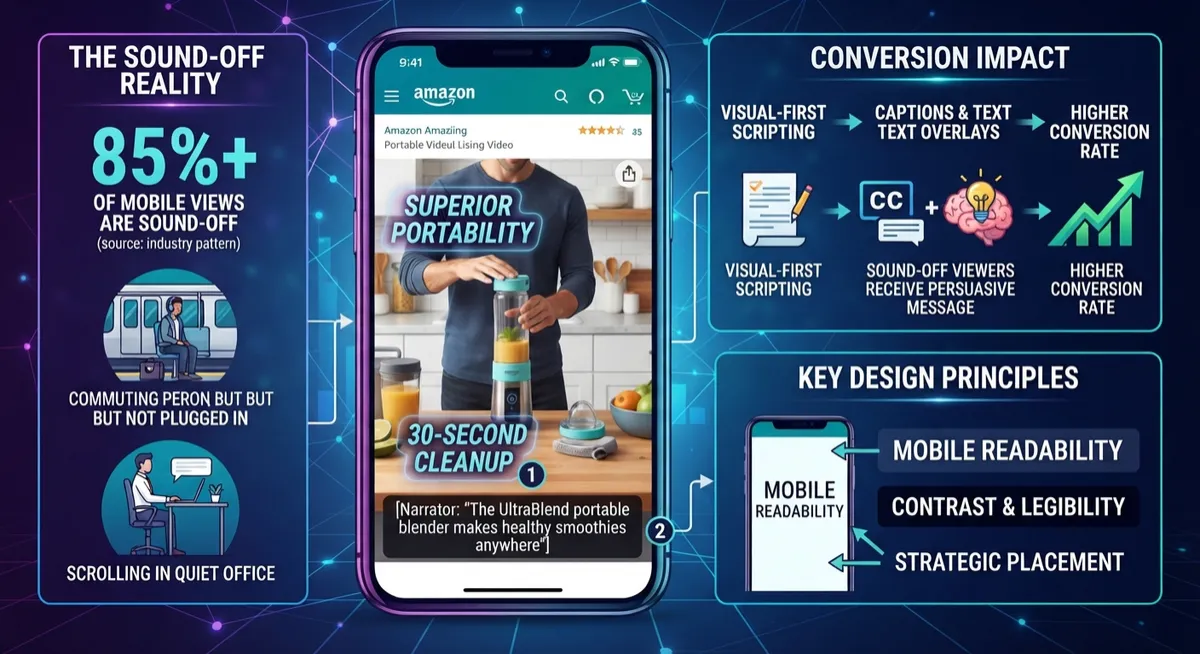
The data on how buyers encounter video content on Amazon is consistent with broader mobile video consumption patterns: the majority of video views on mobile platforms happen without audio. Buyers scrolling Amazon listings on their phones in public places, commuting, in offices, or in households where audio would disrupt others simply don't turn on sound — and many never consider doing so.
For Amazon listing video, this has a specific conversion implication. A video scripted around narration-driven persuasion — where the voiceover delivers the core benefit argument, addresses objections, and builds the case for purchase — delivers almost none of its persuasive content to sound-off viewers. They see moving images of a product being used, but they don't receive the benefit statements, objection-handling content, or trust-building narrative that the video's conversion performance depends on.
Amazon video captions and text overlays that reproduce or parallel this content in visual form allow sound-off viewers to receive the same persuasive information as viewers with sound on — which directly affects conversion rate for the majority audience.
Amazon Video Captions vs. Text Overlays: Understanding the Difference
These terms are sometimes used interchangeably but refer to different content types with different strategic roles.
Captions are time-synchronized transcriptions of spoken narration or dialogue — they reproduce what's being said, displayed at the bottom of the frame. Captions are primarily a sound-off accessibility tool, and they ensure that spoken content reaches viewers who aren't hearing it.
Text overlays are independent visual text elements — benefit callouts, specification highlights, CTAs, emphasis points — that may or may not correspond to spoken content. Text overlays are a visual design choice that adds information to the frame in addition to or instead of spoken content. They function as visual attention direction and benefit communication tools rather than as transcription.
High-converting Amazon listing video typically uses both: captions to reproduce spoken content for sound-off viewers, and strategically placed text overlays to highlight key conversion points visually for all viewers.
Strategic Text Overlay Placement for Conversion
Text overlays in Amazon listing video should be placed at the moments where the visual content alone is insufficient to communicate the conversion-critical information.
At the moment of key benefit claim. When the video demonstrates the product's primary benefit, a text overlay that names the benefit explicitly — "Sets up in 30 seconds" over footage of quick setup, "Fits 40-gallon capacity" over footage of loading the product — ensures the benefit registers with sound-off viewers who are watching the demonstration without the narrated explanation.
During objection-handling segments. When the video addresses a buyer's primary concern — durability, ease of cleaning, compatibility — a text overlay that names the objection being addressed and the answer being demonstrated ensures sound-off viewers follow the persuasive logic: "Built to withstand daily use" over a stress-demonstration segment communicates the objection and answer even without audio context.
At social proof moments. Text overlays that surface star ratings, review counts, or testimonial speaker credentials during social proof segments give viewers who skip or don't hear the testimonial audio a visual anchor for the credibility being established.
At the close. A text overlay at the video's final frames that reinforces the primary benefit or restates the brand's core value proposition serves as the final impression for sound-off viewers who've watched the entire video through the visual experience — ensuring the persuasive close registers even without audio.
Caption Design for Readability and Conversion
Captions that are present but unreadable provide essentially no conversion benefit. Caption design decisions significantly affect whether sound-off viewers actually follow the video narrative.
Contrast and legibility. Captions placed over visually complex or busy footage frequently become unreadable. A subtitle-style placement at the bottom of the frame with a subtle dark background behind light text ensures legibility across diverse video footage.
Font size for mobile. Captions sized for desktop viewing frequently become too small to read comfortably on mobile — which is the primary viewing context for the majority of Amazon listing video views. Test caption legibility specifically on a mobile device at arm's length before finalizing the edit.
Pacing and line length. Caption lines that remain on screen too briefly for comfortable reading, or that contain too many words per line, force viewers to choose between reading and watching. Caption pacing should allow comfortable reading without competing with the visual demonstration they're captioning.
Building Sound-Off Optimization Into the Video Brief
The most reliable way to ensure Amazon listing video is optimized for sound-off viewing is to build it into the production brief from the start — not to address it in post-production after the video has been edited.
Script for visual-first communication. When scripting the video, every key persuasive point should be demonstrable visually rather than exclusively through narration. If a benefit can only be communicated through what's being said — not through what's being shown — that benefit isn't reaching sound-off viewers regardless of caption quality.
Plan overlay placement at the brief stage. Identify in the brief which moments will carry text overlays and what they'll say, so the visual composition at those moments is designed to accommodate text without competing with it.
Test the video muted before final delivery. Watch the completed video with sound off and evaluate whether the core persuasive arc — benefit claim, objection handling, social proof, close — is comprehensible through the visual track and text overlays alone. If the narrative logic breaks down without audio, the video is underperforming for most of its viewers.
Ready to Build Video That Converts for Sound-Off Viewers?
At MyBrand Videos, sound-off optimization is a core requirement in every video brief — not an afterthought. Captions, text overlays, and visual-first scripting are planned before production, not added after the fact.
Related articles:
