Amazon Product Photography: Image Types and Shot List
Amazon product photography decides whether a shopper clicks your listing, understands your product, and trusts it enough to buy. The images do three jobs at once: win the click in search results, answer questions the title cannot, and replace the physical inspection that online shopping removes.
This guide covers the image set a strong listing needs, the rules that govern the main image, the shots most sellers skip, and how to brief a photographer so the result is usable on the first round.
What Amazon Product Photography Needs to Do
Think of the gallery as a short sales conversation in a fixed order. The first image earns the click. Next, a few images explain what the product is and why it is different. Finally, the last ones remove doubt about size, use, and what comes in the box.
Because most shoppers browse on mobile, the first two or three images do most of the work. Therefore, plan the strongest content for the earliest slots rather than spreading it evenly.
Your gallery should also be consistent. Shoppers notice when images look like they came from different brands, and inconsistency lowers trust.
Amazon Product Photography: Main Image Rules and Strategy
The main image is the one that appears in search results, so it follows the strictest rules. Amazon's guidelines typically require:
A pure white background.
The actual product, not an illustration or a rendering that looks fake.
The product filling most of the frame, commonly around 85 percent.
No text, logos, badges, or watermarks added to the image.
High resolution, with enough pixels on the longest side to enable zoom.
No props that are not included in the purchase.
Amazon's own image guidelines list the exact numbers, and categories can have exceptions, so skim them once before your shoot. Beyond compliance, however, the main image has a strategic job: it must stand out in a grid of similar white-background photos.
Angle, lighting, and the way the product is cropped matter more than most sellers expect. Many brands test two or three main image variations to find the one that earns the most clicks. Our article on Amazon main image testing explains how to run that test.
The Listing Image Set: A Reliable Shot List
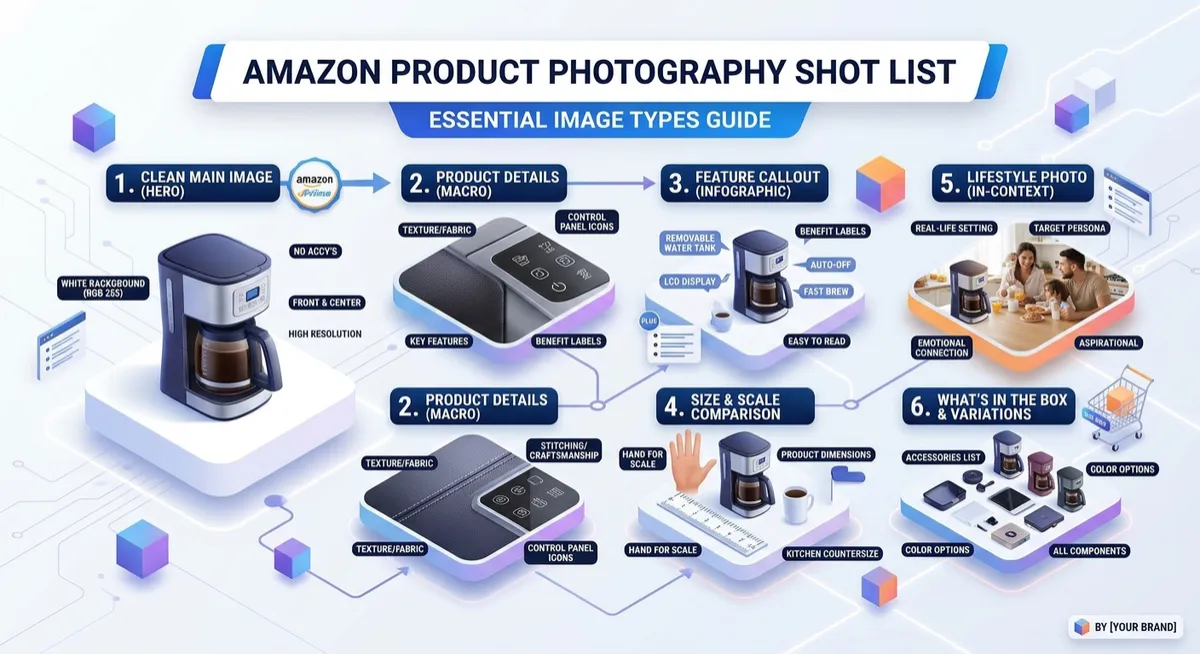
Most categories allow several additional images, so good Amazon product photography uses them all. A balanced set usually includes the following, in roughly this order.
Main image. Clean white background, product centered.
Key benefit infographic. The single most important reason to buy, stated visually.
Lifestyle in use. The product with a real person or setting.
Feature callouts. Close-ups with short labels for the top features.
Size and scale. A person, hand, or familiar object next to the product, plus dimensions.
What's included. Every item in the box, laid out and labeled.
Comparison or "why us." A simple table or visual against generic alternatives, without naming competitors.
Brand story or trust image. Certifications, materials, or guarantees, if they are accurate and allowed.
If your category allows more slots, add a second lifestyle scene for a different buyer type or a how-to-use sequence.
Lifestyle Amazon Product Photography That Sells
Lifestyle images show the product doing its job in the buyer's world. They are where emotion and context enter the gallery, and they are the images most affected by whether a real model, location, and styling were used.
A few principles keep lifestyle photography effective.
Show the problem being solved. A hiking bottle on a trail says more than a bottle on a kitchen counter.
Cast for your buyer. Age, gender, and setting should match the person most likely to purchase. For deeper guidance, read our article on Amazon lifestyle photography and video.
Keep the product the hero. Props and backgrounds support the product. They never compete with it.
Capture variations. One shoot can produce several scenes for different buyer segments, which gives you more to test.
Modern production can also extend a shoot with AI-assisted scenes, for example showing the same product in different settings without a second location day. If AI-generated people appear in an image, check Amazon's current disclosure requirements first.
Infographic and Detail Images
Infographics turn features into benefits at a glance. They are the images shoppers read in the few seconds before deciding whether to keep scrolling.
Good infographic images share a few traits:
One idea per image, not five.
Large, legible text, because the image will be viewed on a phone.
Icons or arrows that point to real parts of the product.
A consistent color and type system across the whole set.
We cover this in depth in a dedicated guide to Amazon infographic design. For now, remember that infographics sit on top of good photography, so the underlying photo needs to be sharp, well lit, and cleanly cut out.
Technical Quality Checklist
Strong Amazon product photography can be undone by poor technical quality. Check each of these before you accept final files.
Sharp focus across the whole product, not just the center.
Accurate color that matches the physical product, which also reduces returns.
Clean edges with no halos on cutouts.
No distracting reflections on glossy or metal surfaces.
Consistent lighting direction across the set.
Correct file type and size for upload.
How to Brief an Amazon Product Photographer
A short, specific brief saves a full round of revisions. Include these items.
The listing link or ASIN, so the photographer sees the category and competitors.
Your top three benefits, in order of importance.
Your main buyer persona, with age, lifestyle, and use case.
A shot list, using the structure above.
Reference images for mood and lighting, clearly marked as references, not as images to copy.
Product details that must be accurate, such as color, finish, and included accessories.
Delivery specs, including file type, size, and naming.
For budgeting, our Amazon video production cost guide explains how shoot days, models, and locations affect price. The same cost logic applies to photography.
Photography and Video Work Better Together
In practice, photos and video support each other. Photos carry the quick scan, while video carries the explanation. Shooting both in one session also saves a production day, and it keeps lighting and styling consistent. If you are planning both, our listing video optimization guide shows how video fits into the same page.
Ready for a Gallery That Converts?
At My Brand Videos, we produce Amazon product photography, lifestyle scenes, and infographic design as a single, consistent set, built from a shot list tailored to your buyer. Book a free listing audit and we will review your current gallery.
Related articles:
